Dockerizing a PHP and MySQL/MariaDB Application with Docker Compose
Learn how to containerize your PHP application with a MariaDB backend using Docker and Docker Compose. This guide walks you through creating a clean Dockerfile and docker-compose.yml to streamline local development, enable database persistence, and ensure service health — all with environment-based configuration for flexibility.s
✅ Folder Structure
1
2
3
4
5
6
my-php-sql-app/
├── Dockerfile
├── docker-compose.yml
├── .env
├── index.php
└── elearn.sql #db file for the app
📦 GitHub Repository: 👉 Complete source code and setup files
🐳 Dockerfile (for PHP + Apache)
1
2
3
4
5
6
7
8
9
10
11
12
13
FROM php:8.1-apache

RUN apt-get update && \
    apt-get install -y git && \
    docker-php-ext-install mysqli pdo pdo_mysql

COPY . /var/www/html/

EXPOSE 80

RUN a2enmod rewrite

CMD ["apache2-foreground"]
📘 Explanation of Each Line
| Line | Description |
|---|---|
FROM php:8.1-apache | Uses an official Docker image that includes PHP 8.1 and Apache. This is the base for your PHP web server. |
RUN apt-get update && apt-get install -y git ... | Updates package lists, installs git, and installs PHP extensions (mysqli, pdo, pdo_mysql) for MySQL/MariaDB database connectivity. |
COPY . /var/www/html/ | Copies all files from your current local directory into the Apache web root (/var/www/html) inside the container. |
EXPOSE 80 | Informs Docker that the container will use port 80 (Apache default HTTP port). |
RUN a2enmod rewrite | Enables Apache’s URL rewriting module, required by many PHP frameworks like Laravel or CodeIgniter. |
CMD ["apache2-foreground"] | Starts Apache in the foreground so the container stays alive and serves HTTP requests. |
🧱 docker-compose.yml
1
2
3
4
5
6
7
8
9
10
11
12
13
14
15
16
17
18
19
20
21
22
23
24
25
26
27
28
29
30
31
32
33
34
35
36
37
38
39
40
41
42
43
44
45
46
47
48
49
50
51
52
53
54
55
56
57
58
59
60
61
62
63
64
65
66
67
68
69
70
71
72
73
74
75
76
77
78
79
# Specify the version of Docker Compose syntax being used.
version: '3.8'

services:
  # -------------------------------
  # Web server (PHP + Apache)
  # -------------------------------
  web:
    container_name: php_web_app  # Sets a custom name for the web container.
    build: .                     # Builds the Docker image using the Dockerfile in the current directory.

    ports:
      - "${APP_PORT}:80"        # Maps host port (from .env) to container port 80. Use http://localhost:${APP_PORT} to access.

    volumes:
      - .:/var/www/html/        # Mounts your current project directory into the container to reflect file changes immediately.

    depends_on:
      db:
        condition: service_healthy  # Wait for the database to be healthy before starting the web server.

    environment:
      # These environment variables are passed into the container to configure the database connection.
      MYSQL_HOST: db
      MYSQL_DATABASE: ${MYSQL_DATABASE}
      MYSQL_USER: ${MYSQL_USER}
      MYSQL_PASSWORD: ${MYSQL_PASSWORD}

    restart: unless-stopped     # Automatically restart unless the container is explicitly stopped.

    networks:
      - my_custom_network       # Connects this service to the custom defined network.

  # -------------------------------
  # MariaDB database service
  # -------------------------------
  db:
    container_name: mariadb_server  # Sets a custom name for the database container.
    image: mariadb:10.6             # Uses the official MariaDB image (version 10.6).

    environment:
      # Set up initial database and user credentials using environment variables.
      MYSQL_ROOT_PASSWORD: ${MYSQL_ROOT_PASSWORD}
      MYSQL_DATABASE: ${MYSQL_DATABASE}
      MYSQL_USER: ${MYSQL_USER}
      MYSQL_PASSWORD: ${MYSQL_PASSWORD}

    volumes:
      - db_data:/var/lib/mysql      # Persists database files between container restarts.
      - ./elearn.sql:/docker-entrypoint-initdb.d/elearn.sql  # Initializes the DB with this SQL file on first run.

    healthcheck:
      # Health check to ensure the DB is ready before allowing dependent containers to start.
      test: ["CMD", "mariadb-admin", "ping", "-h", "localhost"]
      interval: 10s
      timeout: 5s
      retries: 5
      start_period: 30s

    ports:
      - "${DB_PORT}:3306"           # Maps MariaDB port 3306 in container to DB_PORT on host.

    restart: unless-stopped         # Restart the DB container unless stopped manually.

    networks:
      - my_custom_network           # Connects the DB service to the custom network.

# -------------------------------
# Named volume to persist DB data
# -------------------------------
volumes:
  db_data:                          # This volume stores MariaDB data even if the container is removed.

# -------------------------------
# Custom Docker network
# -------------------------------
networks:
  my_custom_network:                # User-defined bridge network allows clean communication between services.
    driver: bridge                  # Bridge driver is default and suitable for most applications.
📝 **Docker Compose Notes **
🔢 version: '3.8'
Specifies the version of the Docker Compose file syntax.
3.8is compatible with modern Docker versions.- Other versions:
'3','3.1','3.7','2.4', etc. - Use the version best suited for your Docker Engine.
🧩 services:
Defines the services (containers) that make up your application.
1️⃣ Web Service (web)
🏷️ container_name: php_web_app
Custom name for the container (instead of auto-generated).
🏗️ build: .
Builds an image using the Dockerfile in the current directory (.).
🌐 ports:
1
- "${APP_PORT}:80"
- Maps container’s port
80(Apache default) to host port specified in.envasAPP_PORT. - Format:
HOST_PORT:CONTAINER_PORT - Example:
8080:80→ Access viahttp://localhost:8080
📁 volumes:
1
- .:/var/www/html/
- Mounts your project directory (
.) into the container. - Changes on host files are reflected in the container.
- Format:
host_path:container_path - Useful for live development.
🔁 depends_on:
Ensures web service waits for db to be healthy before starting.
1
2
db:
  condition: service_healthy
- Requires
dbto pass health check.
🌱 environment:
Environment variables passed into the container for DB connection:
1
2
3
4
MYSQL_HOST: db
MYSQL_DATABASE: ${MYSQL_DATABASE}
MYSQL_USER: ${MYSQL_USER}
MYSQL_PASSWORD: ${MYSQL_PASSWORD}
${VAR}refers to variables defined in a.envfile.
🔄 restart: unless-stopped
Restarts the container unless explicitly stopped. Other options:
no– Never restartalways– Always restarton-failure– Restart on error exit
🌐 networks:
1
- my_custom_network
Connects the service to a user-defined network for internal communication.
2️⃣ Database Service (db)
🏷️ container_name: mariadb_server
Custom name for the MariaDB container.
📦 image: mariadb:10.6
Uses MariaDB image (v10.6).
- You can use other versions:
mariadb:latest,mariadb:10.11, etc.
🌱 environment:
Sets up DB on first run:
1
2
3
4
MYSQL_ROOT_PASSWORD: ${MYSQL_ROOT_PASSWORD}
MYSQL_DATABASE: ${MYSQL_DATABASE}
MYSQL_USER: ${MYSQL_USER}
MYSQL_PASSWORD: ${MYSQL_PASSWORD}
📁 volumes:
1
2
- db_data:/var/lib/mysql
- ./elearn.sql:/docker-entrypoint-initdb.d/elearn.sql
db_datastores persistent database files.elearn.sqlinitializes the DB if it doesn’t already exist.
💊 healthcheck:
Ensures DB is ready before web depends on it:
1
2
3
4
5
test: ["CMD", "mariadb-admin", "ping", "-h", "localhost"]
interval: 10s
timeout: 5s
retries: 5
start_period: 30s
- Checks every 10s for DB response.
- Tries 5 times before declaring unhealthy.
🌐 ports:
1
- "${DB_PORT}:3306"
- Maps host port (
DB_PORT) to MariaDB default port (3306).
🔄 restart: unless-stopped
Same behavior as web.
🌐 networks:
Joins the same network to allow internal access by service name (db).
💾 volumes:
db_data:
Defines a named volume for persisting database data across restarts/removals.
Other volume types:
host:./data:/dataanonymous:/data(Docker assigns random name)named:db_data
🌐 networks:
my_custom_network:
User-defined network to allow services to talk via service names.
1
driver: bridge
bridge(default) for communication between containers.Other drivers:
🔐 .env
MYSQL_ROOT_PASSWORD=SuperSecureRootPass123
MYSQL_DATABASE=elearn
MYSQL_USER=devops
MYSQL_PASSWORD=123devops
APP_PORT=8899
DB_PORT=3307
🌐 index.php
1
2
3
4
5
6
7
8
9
10
11
12
13
14
15
16
17
18
19
20
21
22
23
24
25
26
27
28
29
30
31
32
33
34
35
36
37
38
39
40
41
42
43
44
45
46
47
48
49
50
51
52
53
54
55
56
57
58
59
60
61
62
63
64
65
66
67
68
69
70
71
72
73
74
75
76
77
78
79
80
81
82
83
84
85
86
87
88
89
90
91
92
93
94
95
96
97
98
99
100
101
102
103
104
105
106
107
108
109
110
111
112
113
114
115
116
117
118
119
120
121
122
123
124
125
126
127
128
129
130
131
132
133
134
135
136
137
138
139
140
141
142
143
144
145
146
147
148
149
150
151
152
153
154
155
156
157
158
159
160
161
162
163
164
165
166
167
168
169
170
171
172
173
174
175
176
177
<?php
// Run the app: php -S localhost:8000
//$con = mysqli_connect("localhost", "devops", "123devops", "elearn");
?>
<?php
// Retrieve database connection details from environment variables
$db_host = getenv('MYSQL_HOST') ?: 'db'; // 'db' is the service name in docker-compose.yml
$db_user = getenv('MYSQL_USER') ?: 'devops';
$db_pass = getenv('MYSQL_PASSWORD') ?: '123devops';
$db_name = getenv('MYSQL_DATABASE') ?: 'elearn';
// Establish the database connection
$con = mysqli_connect($db_host, $db_user, $db_pass, $db_name);
// Check connection
if (mysqli_connect_errno()) {
echo "Failed to connect to MySQL: " . mysqli_connect_error();
exit();
}
?>
<!DOCTYPE html>
<html lang="en">
<head>
<meta charset="utf-8" />
<meta http-equiv="X-UA-Compatible" content="ie=edge" />
<meta name="viewport" content="width=device-width, initial-scale=1.0, maximum-scale=5.0, user-scalable=yes" />
<title>Medical Health : JKS </title>
<style>
*{box-sizing:border-box}body{font-family:Times New Roman,serif;background-color:#c6cbccc7!important;margin:0;padding:0;line-height:1.6}.containerfaq{padding:2em 1rem;max-width:100%;margin:0 auto}@media (min-width:576px){.containerfaq{padding:2em 2rem;max-width:540px}}@media (min-width:768px){.containerfaq{padding:2em 4rem;max-width:720px}}@media (min-width:992px){.containerfaq{padding:2em 6rem;max-width:960px}}@media (min-width:1200px){.containerfaq{padding:2em 8rem;max-width:1140px}}.dictionary .dictionary-item{border-bottom:4px solid #929292}.dictionary .dictionary-item button[aria-expanded=true]{border-bottom:4px solid #1c0ef2}.dictionary button{position:relative;display:block;text-align:left;width:100%;color:#333;font-size:1.15rem;font-weight:600;border:none;background:0 0;outline:0;padding:1em 0}.dictionary button:focus,.dictionary button:hover{cursor:pointer;color:#1c0ef2!important}.dictionary button:focus::after,.dictionary button:hover::after{cursor:pointer;color:#1c0ef2!important;border:1px solid #1c0ef2!important}.dictionary button .WTitle{padding:0 1.5em 0 0;line-height:22px}.dictionary button .iconplus{display:inline-block;position:absolute;top:50%;right:0;transform:translateY(-50%);width:22px;height:22px;border:1px solid;border-radius:22px}.dictionary button .iconplus::before{display:block;position:absolute;content:"";top:9px;left:5px;width:10px;height:2px;background:currentColor}.dictionary button .iconplus::after{display:block;position:absolute;content:"";top:5px;left:9px;width:2px;height:10px;background:currentColor}.dictionary button[aria-expanded=true],.sorting-container a:hover{color:#1c0ef2}.dictionary button[aria-expanded=true] .iconplus::after{width:0}.dictionary button[aria-expanded=true]+.WDescription{opacity:1;max-height:max-content;transition:.2s linear;will-change:opacity,max-height}.dictionary .WDescription{opacity:0;max-height:0;overflow:hidden;transition:opacity .2s linear,max-height .2s linear;will-change:opacity,max-height;padding:0 1em}.dictionary .WDescription h1{font-size:1.5rem;font-weight:500;margin:1em 0;line-height:1.5}.title>.bandage{display:inline-block;width:38px;height:30px;border-radius:50%!important;text-align:center;padding-top:.3em;font-size:15px;margin-right:12px;border:1px solid #333}h1,h2{font-size:20px}#search-bar{width:100%;color:#302f2f;font-weight:800;font-size:18px;border:2px solid #ccc;border-radius:5px;margin-bottom:2em;padding:.5em 1em .5em 3em;background-image:url('data:image/svg+xml;utf8,<svg xmlns="http://www.w3.org/2000/svg" width="16" height="16" fill="currentColor" viewBox="0 0 16 16"><path d="M11.742 10.344a6.5 6.5 0 1 0-1.397 1.398h-.001c.03.04.062.078.098.115l3.85 3.85a1 1 0 0 0 1.415-1.414l-3.85-3.85a1.007 1.007 0 0 0-.115-.1zM12 6.5a5.5 5.5 0 1 1-11 0 5.5 5.5 0 0 1 11 0z"/></svg>');background-repeat:no-repeat;background-position:1em center;background-size:1.5em;height:50px}#search-bar:focus,#search-bar:hover{border:2px solid red}header#main-header{position:fixed;left:0;right:0;top:0;text-align:center;z-index:10000003;background:rgb(20 20 20 / .8)!important;-webkit-backdrop-filter:blur(10px);backdrop-filter:blur(10px);padding:.5em 1em}.navbar{display:flex;align-items:center;justify-content:center;width:100%}.navbar a{font-size:1.5em;font-weight:900;color:#b5b3b3;padding:0;text-decoration:none;white-space:nowrap;overflow:hidden;text-overflow:ellipsis;max-width:100%}@media (min-width:768px){.navbar a{font-size:2em}}@media (min-width:992px){.navbar a{font-size:3em;padding:0 0 0 1em}}main{padding-top:70px}@media (min-width:768px){main{padding-top:80px}}.headertoop{position:fixed;top:0;width:100%;background-color:#292929;z-index:2147483648;left:0}.progress-bar{height:5px;background:red;width:0%}#scrollup{position:fixed;margin:0;color:#3c2424;bottom:1em;cursor:pointer;right:1em;height:45px;width:42px;font-weight:1000;text-align:center;font-size:40px;display:none;background:rgba(255,255,255,0);border-radius:50%;line-height:45px}#scrollup:hover{opacity:1;color:red}.pagination{margin:1em 0;text-align:center;padding:10px;font-size:16px}.pagination a,.pagination span{display:inline-block;background-color:#f2f2f2;border:1px solid #ddd;padding:5px 10px;margin:0 2px;color:#333;text-decoration:none;border-radius:5px;font-size:16px}.pagination a:hover{background-color:#bd7878;color:#fff}.pagination .current{background-color:#27408b;color:#fff;margin:0 2px;padding:5px 10px;border-radius:5px;font-size:16px}.pagination-dots{padding:5px 10px;margin-right:5px}.sorting-container{padding-bottom:20px;text-align:center;margin:1em 0}.sorting-container p{font-size:18px;border:2px solid green;display:inline-block;border-radius:8px;padding:10px;margin:0}.sorting-container a{padding:0 5px;color:#333;text-decoration:none}@media (max-width:768px){.sorting-container p{font-size:16px;padding:8px}.sorting-container a{display:inline-block;padding:5px}h1,h2{font-size:18px}.dictionary .WDescription p,.dictionary button{font-size:16px!important}}@media (max-width:576px){.dictionary button{font-size:1rem!important;padding:.8em 0}.dictionary .WDescription h1{font-size:1.1rem;margin:.8em 0}.title>.bandage{width:30px;height:24px;font-size:13px;padding-top:.2em;margin-right:8px}}
</style>
</head>
<body>
<!-- ----------------scroll indicator------------ -->
<div title="Scroll Indicator" class="headertoop">
<div class="progress-bar" id="myBar"></div>
</div>
<!-- -------------end------------ -->
<!-- Header -->
<header id="main-header">
<nav class="navbar">
<a href="./index.php">Medical Health - Dr. Janak</a>
</nav>
</header>
<!-- Header End -->
<main>
<div style="text-align: center;">
<h1><b style="color: rgb(73 71 71); text-transform: capitalize; font-size: 1.5em">Medical Health Dictionary : <?= "<b>" . mysqli_fetch_assoc(mysqli_query($con, "SELECT COUNT(*) as total FROM words_collection"))["total"] . " words</b>"; ?> </b></h1>
</div>
<div class="containerfaq">
<input type="text" id="search-bar" placeholder="Search here..." />
<?php
// Sanitize and set the sorting column
$sort = isset($_GET['sort']) ? htmlspecialchars($_GET['sort']) : 'title';
// Sanitize and set the sorting order
$order = isset($_GET['order']) && $_GET['order'] == 'desc' ? 'DESC' : 'ASC';
// Set the number of records to display per page
$records_per_page = 50;
// Get the current page number from the query string
$current_page = isset($_GET['page']) ? intval($_GET['page']) : 1;
// Calculate the offset for the SQL query
$offset = ($current_page - 1) * $records_per_page;
// Generate the sorting links/buttons
echo '<div class="sorting-container">';
echo '<p>';
echo 'Sort by:';
echo '<a href="?sort=title&order=desc&page=' . $current_page . '">Name(↑)</a>|';
echo '<a href="?sort=title&order=asc&page=' . $current_page . '">Name(↓)</a>';
echo '</p>';
echo '</div>';
// Build the SQL query using the selected sorting method and order
$sql = "SELECT * FROM words_collection ORDER BY $sort $order LIMIT $offset, $records_per_page";
// Execute the SQL query
$result = mysqli_query($con, $sql);
// Calculate total pages for pagination
$sql_total = "SELECT COUNT(*) AS count FROM words_collection";
$result_total = mysqli_query($con, $sql_total);
$row_total = mysqli_fetch_assoc($result_total);
$total_records = $row_total["count"];
$total_pages = ceil($total_records / $records_per_page);
// --- Start of Pagination HTML Function ---
function generatePaginationHtml($currentPage, $totalPages, $sort, $order, $self) {
$pagination_html = '<div class="pagination">';
if ($currentPage > 1) {
$pagination_html .= '<a href="' . $self . '?sort=' . $sort . '&order=' . $order . '&page=' . ($currentPage - 1) . '">« Prev</a>';
}
$start_page = max(1, $currentPage - 2);
$end_page = min($start_page + 5, $totalPages);
if ($start_page > 1) {
$pagination_html .= '<a href="' . $self . '?sort=' . $sort . '&order=' . $order . '&page=1" class="pagination-link">1</a>';
if ($start_page > 3) {
$pagination_html .= '<span class="pagination-dots">…</span>';
}
}
for ($i = $start_page; $i <= $end_page; $i++) {
if ($i == $currentPage) {
$pagination_html .= '<span class="current">' . $i . '</span>';
} else {
$pagination_html .= '<a href="' . $self . '?sort=' . $sort . '&order=' . $order . '&page=' . $i . '" class="pagination-link">' . $i . '</a>';
}
}
if ($end_page < $totalPages) {
if ($end_page < $totalPages - 1) {
$pagination_html .= '<span class="pagination-dots">…</span>';
}
$pagination_html .= '<a href="' . $self . '?sort=' . $sort . '&order=' . $order . '&page=' . $totalPages . '" class="pagination-link">' . $totalPages . '</a>';
}
if ($currentPage < $totalPages) {
$pagination_html .= '<a href="' . $self . '?sort=' . $sort . '&order=' . $order . '&page=' . ($currentPage + 1) . '">Next »</a>';
}
$pagination_html .= '</div>';
return $pagination_html;
}
// --- End of Pagination HTML Function ---
// Display pagination at the TOP
echo generatePaginationHtml($current_page, $total_pages, $sort, $order, $_SERVER["PHP_SELF"]);
// Initialize the $index variable
$index = ($current_page - 1) * $records_per_page + 1;
// Output HTML elements dynamically based on data
echo '<div class="dictionary">';
while ($row = mysqli_fetch_assoc($result)) {
// Display the item with the unique id
$html = '<div class="dictionary-item" id="title-' . $row["id"] . '">';
$html .= '<button aria-expanded="false">';
$html .= '<p class="title" >';
$html .= '<span class="bandage">' . $index . '</span>' . $row["title"];
$html .= '</p>';
$html .= '<span class="iconplus"></span>';
$html .= '</button>';
$html .= '<div class="WDescription">';
$html .= '<h1>' . $row["description"];
$html .= '</div>';
$html .= '</div>';
echo $html;
// Increment the index after each iteration
$index++;
}
echo '</div>';
// Display pagination at the BOTTOM
echo generatePaginationHtml($current_page, $total_pages, $sort, $order, $_SERVER["PHP_SELF"]);
echo '</div>';
?>
</div>
</main>
<!-- ------------------- scroll up btn ----------------- -->
<div id="scrollup" title="Go to top" onclick="document.documentElement.scrollTop = 0;">△</div>
<!-- ------------ end ------------- -->
<script>
window.onscroll=function(e){let t=document.body.scrollTop||document.documentElement.scrollTop,l=document.documentElement.scrollHeight-document.documentElement.clientHeight;document.getElementById("myBar").style.width=t/l*100+"%",document.body.scrollTop>400||document.documentElement.scrollTop>400?document.getElementById("scrollup").style.display="block":document.getElementById("scrollup").style.display="none",prevScrollpos>window.pageYOffset?document.getElementById("main-header").style.display="block":document.getElementById("main-header").style.display="none",prevScrollpos=window.pageYOffset};let prevScrollpos=window.pageYOffset;const items=document.querySelectorAll(".dictionary button");function toggleDictionary(){let e=this.getAttribute("aria-expanded");for(let t=0;t<items.length;t++)items[t].setAttribute("aria-expanded","false");"false"==e&&this.setAttribute("aria-expanded","true")}items.forEach(e=>e.addEventListener("click",toggleDictionary));const searchBar=document.getElementById("search-bar");function searchDictionary(){let e=searchBar.value.toLowerCase(),t=document.querySelectorAll(".dictionary-item");t.forEach(t=>{let l=t.querySelector(".title").textContent.toLowerCase();l.includes(e)?t.style.display="block":t.style.display="none"})}searchBar.addEventListener("input",searchDictionary);
</script>
</body>
</html>
🏁 Run the App
In the same directory:
1
docker compose up --build -d
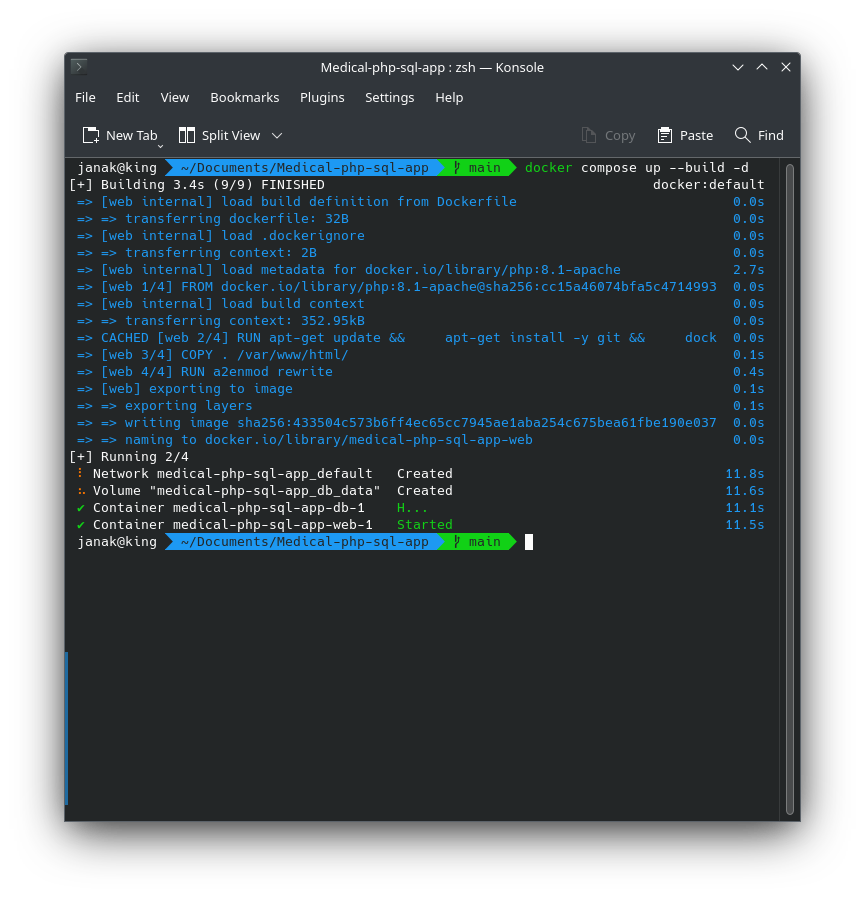
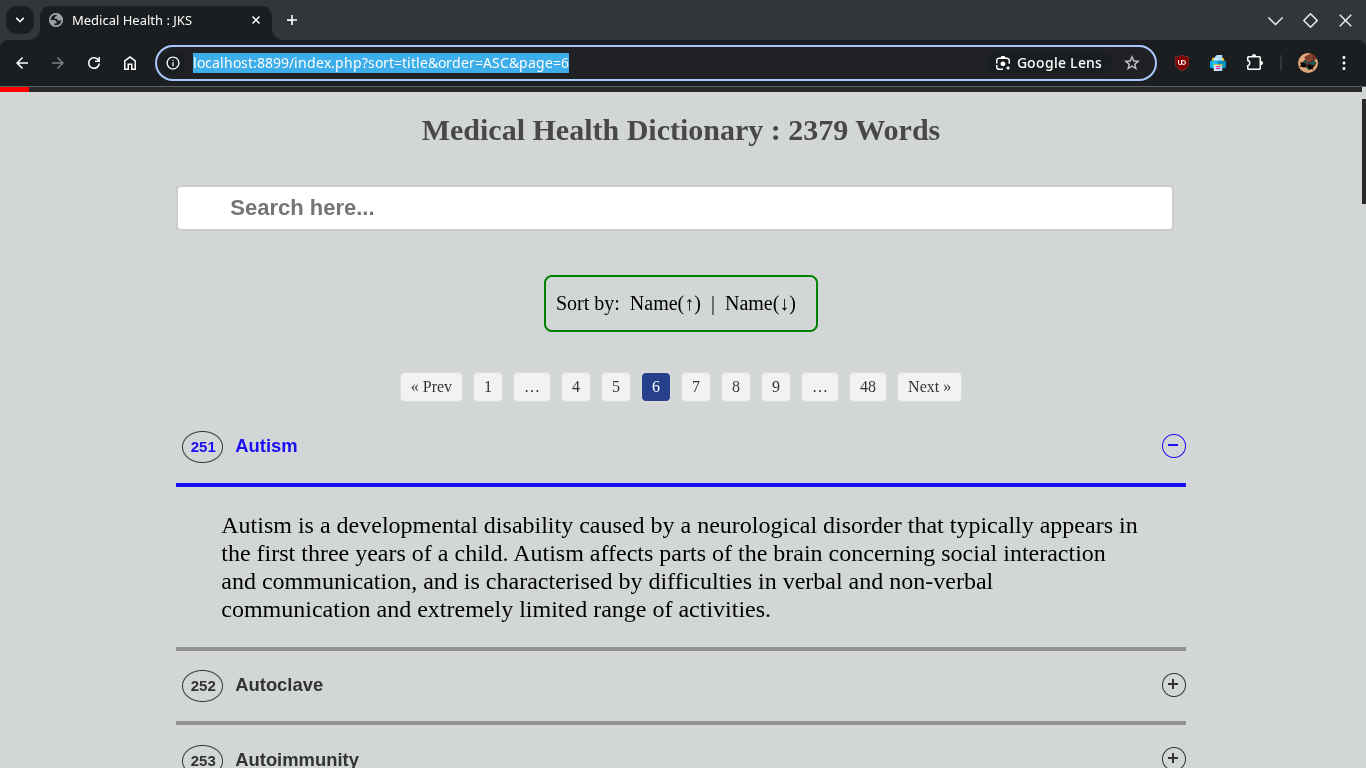
Visit: http://localhost:8899
🛑 Stop, Clean and manage
- To stop your application (and keep the database data):
1
  docker compose down
This will stop and remove the
webanddbcontainers, but thedb_datavolume will remain, so your database content will be preserved for the next time you start. - To start your application again (after stopping it):
1
  docker compose up -d
This will bring your containers back up, using the existing images and data.
- To stop your application and remove all associated data (a complete fresh start):
1
  docker compose down -v
The
-vflag tells Docker Compose to also remove any named volumes, includingdb_data. Use this if you want to completely reset your database to the state defined ininit.sql.
✅ docker compose down --remove-orphans
This command stops and removes containers, networks, and volumes created by docker-compose up.
down: Brings down (shuts off and removes) all the services defined in yourdocker-compose.yml.--remove-orphans: Removes any “orphaned” containers – containers that were started by Docker Compose but are no longer referenced in the currentdocker-compose.yml. This is useful when you’ve removed a service from the file but its container is still running.
Use case: Cleaning up your environment completely when you’re done or making a fresh start.
✅ docker volume ls
This lists all Docker volumes on your system.
- Volumes are used to persist data outside of containers (like databases).
- This command helps you see which volumes exist — including ones created by
docker-composeor manually.
🔥 Basic Syntax: delete a Docker volume
1
docker volume rm <volume_name>
✅ docker rm -f cfdae4f82afd
This forcefully removes a container using its ID (in this case: cfdae4f82afd).